An ELEGOO starter kit project · reinforcement learning · sim to real
SWING KID
A shoebox with legs that learns to pump a swing in a dream, then does it for real.
- about an hour to build
- no cutting, no glue, no measuring
- 27 narrated steps, 17 minutes
- a brain adapts to your swing in minutes
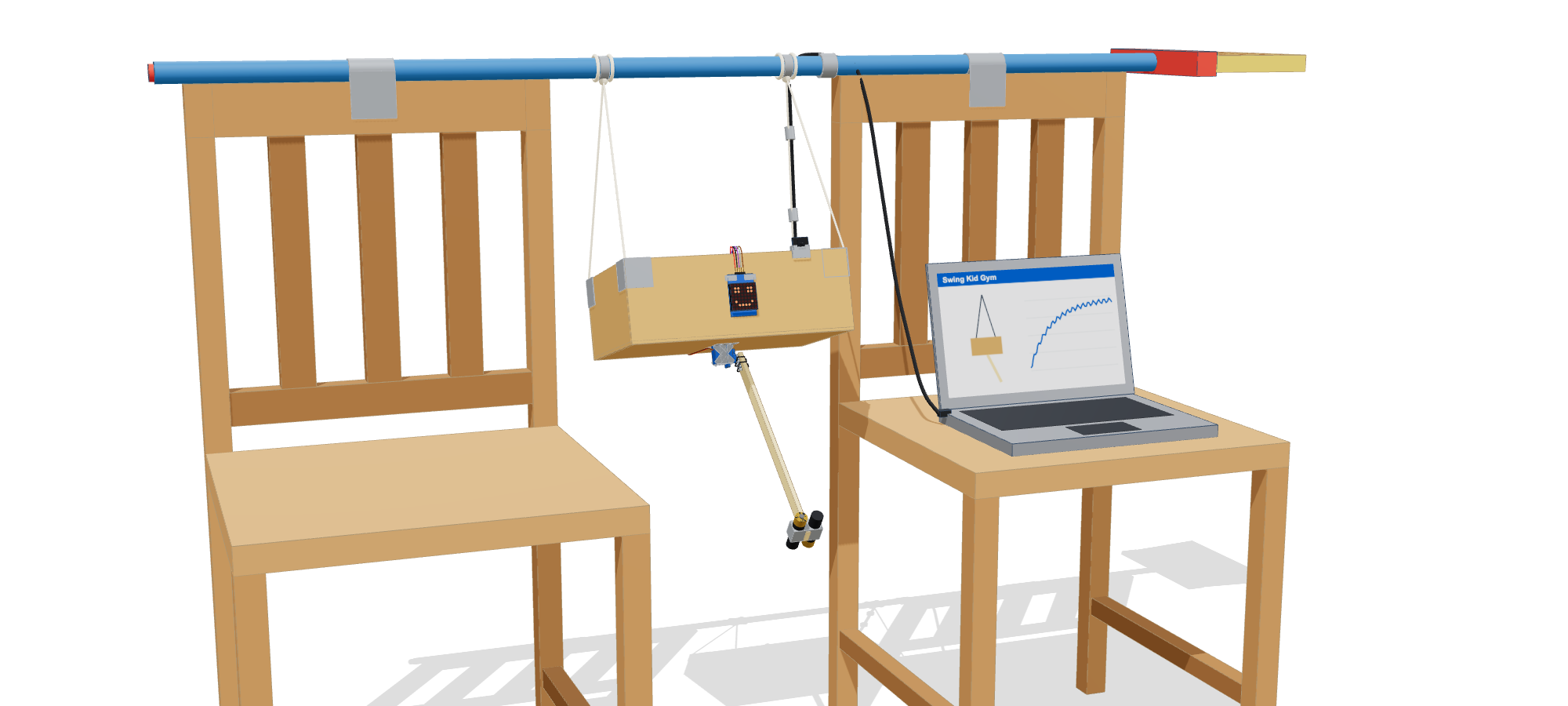 the finished robot
Welcome
You'll hang a shoebox from a broom, give it a face and a pair of long legs, and it will learn to pump itself higher the way a kid on a playground swing does: kick at the right moment, every swing. Nobody writes the rule for when to kick. A small neural network works it out by reinforcement learning in a simulator you can watch, the Gym. Then you send that brain down the USB cable into the Arduino and find out whether what it learned in the dream works in reality.
No cutting, no glue, no measuring. String, duct tape and zip ties hold everything together, and every size in this guide is "about". The robot measures its own swing when it calibrates.
Everything was tested in simulation before you build it. The firmware ran on a computer against the simulated swing, and calibration was tried on 100 simulated builds with the motion sensor taped on at random angles and the servo mounted either way round. The brain you'll train beats the textbook pumping rule. What I couldn't test is your actual box and broom. That's the experiment.
How it works
Moving its legs can't push Swing Kid anywhere. All it can do is shift its own weight, and that only adds height if the timing is right: kick at one moment of each swing and it goes a little higher, kick half a swing later and it slows down. That timing problem is what the brain learns. It's the same problem a kid solves on a playground, and the same skill lets Swing Kid stop itself dead.
The trick that makes a dream-trained brain survive reality is domain randomization. Every practice run, the simulator re-rolls the quirks: how long the strings are, how heavy the box and feet are, how weak and slow the servo is, how much air drag and cable tug there is, how much the gyro drifts. A brain that swings well in all of those worlds has a good chance in yours.
What you need
From the kit (names as on the lid)
From home
Set up the swing
Three things, about ten minutes, nothing to cut. The box gets hung up in Part 4, after its electronics have been tested on the table.
The bar and the strings
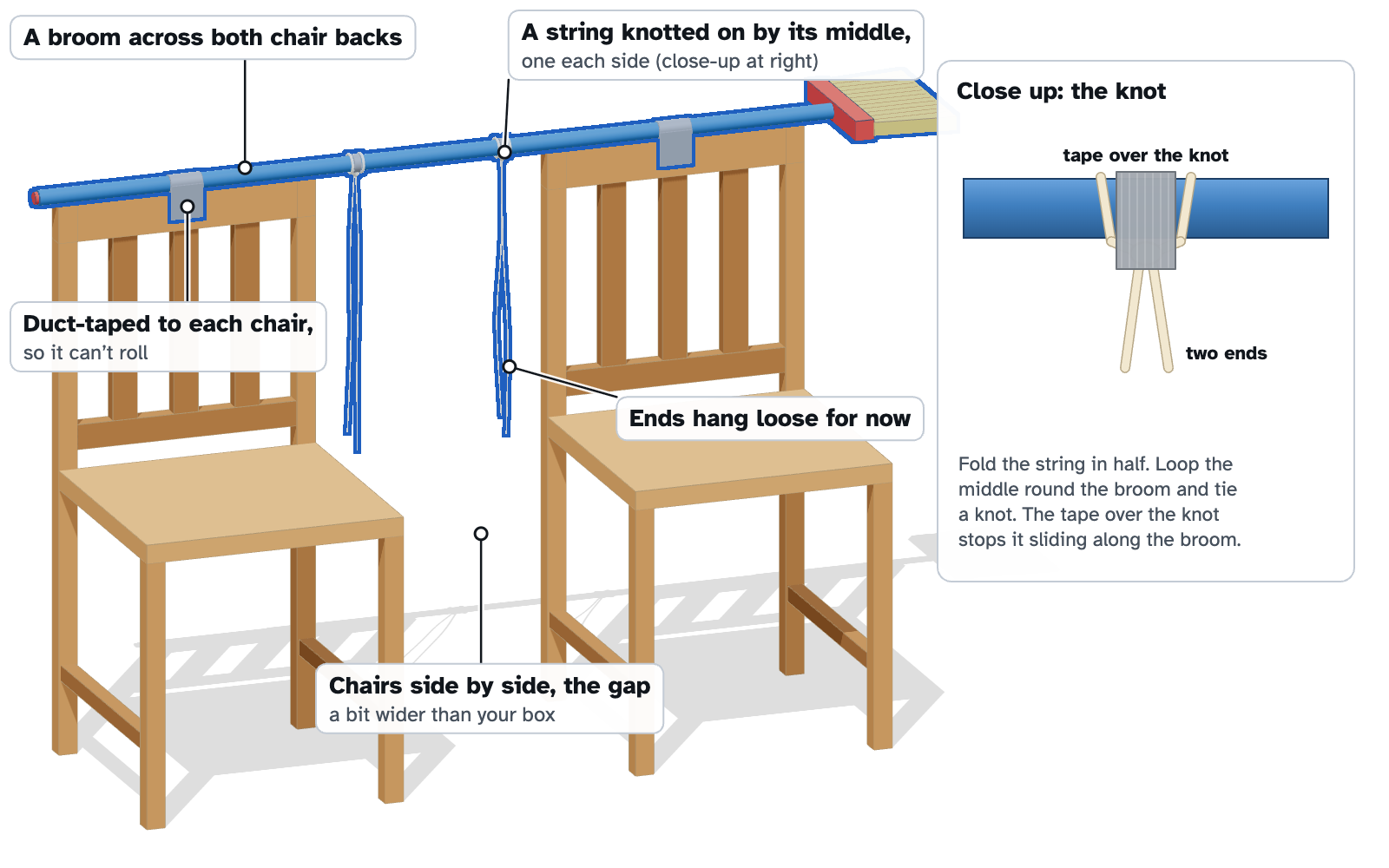
- Stand two chairs of the same height about a long stride apart. Lay the broom across the tops of both chair backs, handle in the middle.
- Duct-tape the handle to each chair back so it can't roll or slide.
- You need two pieces of string, each about an arm's span long (snip them with scissors, or use two long shoelaces).
- Tie the middle of each string around the broom handle with a double knot: one a hand's width left of the middle, one a hand's width right of it. Put a strip of duct tape over each knot so it can't slide along the handle. The ends hang loose for now.
No chairs handy? Any bar about chest high works: a closet rod, a pull-up bar, a sturdy curtain rod. The box needs about an arm's length of clear space in front and behind it to swing.
Servo under the box
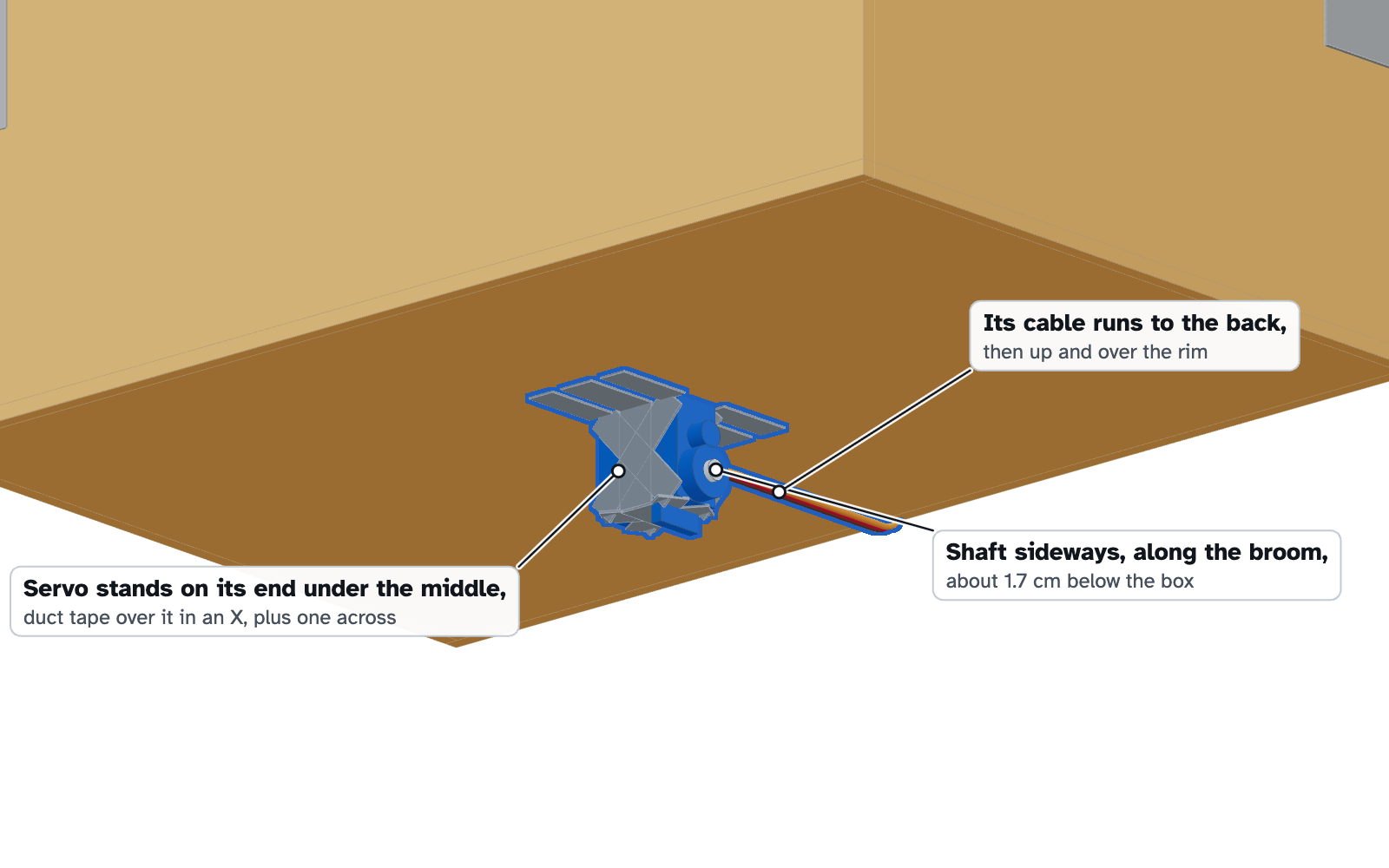
- Turn the box upside down. Stand the servo on its end in the middle of the bottom: the end farthest from its shaft (the little white gear) goes against the cardboard, so the shaft points sideways toward one end of the box, not the front or back. The shaft ends up about 2 cm clear of the box, room for the arm to swing.
- Tape it down hard: two strips of duct tape over the servo and onto the cardboard in an X, and one more across. Keep tape off the shaft.
- Leave the servo's wire free. It will run up the back of the box later.
The servo is Swing Kid's hips. It has to stay put when it kicks, so press the tape down firmly onto the cardboard all around it.
Wire the electronics
Do this on the table with the box beside you and nothing plugged in. In each diagram the new wires are in full color and earlier ones are faded. Any hole on the correct rail works; the diagrams show a tidy layout that keeps everything in the left half of the board.
Power
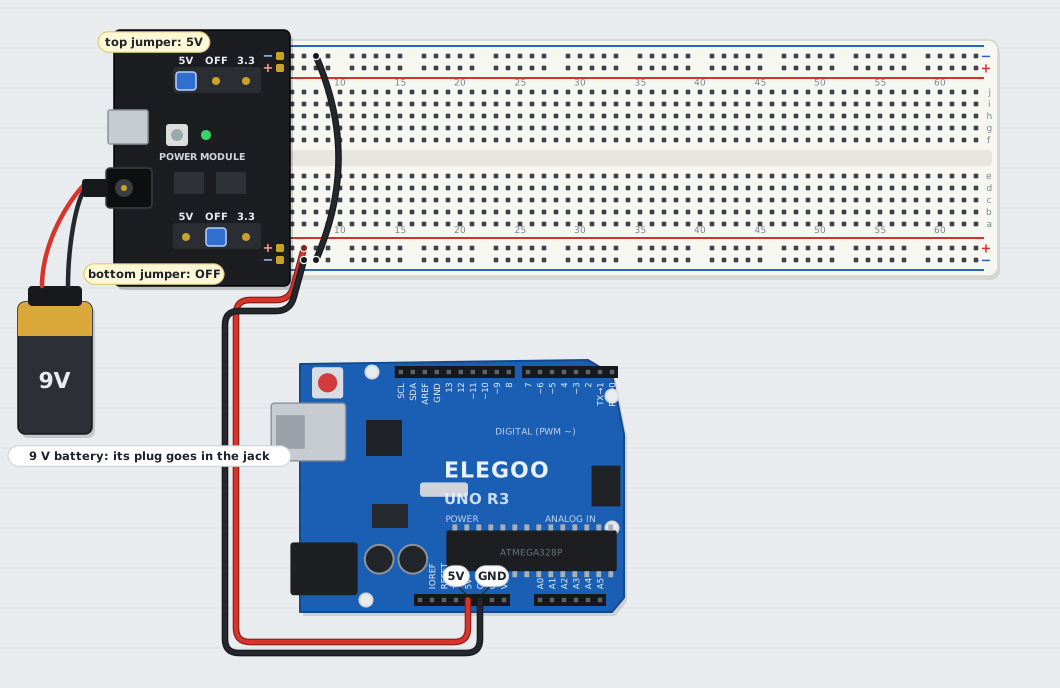
- Press the Power Supply Module onto the left end of the breadboard: its − pins on the blue stripes, + pins on the red stripes, round jack facing out.
- Top jumper on 5V. Bottom jumper on OFF.
- Red jumper: Arduino 5V → bottom red (+) rail. Black jumper: Arduino GND → bottom blue (−) rail.
- Black jumper: top blue rail → bottom blue rail, so both supplies share a ground.
- Snap the clip onto the 9V battery, but don't plug it in yet.
Why two supplies: the servo pulls sudden bursts of current. The battery, through the power module, feeds only the servo (top rail). The Arduino, powered over USB, feeds everything else (bottom rail).
Servo
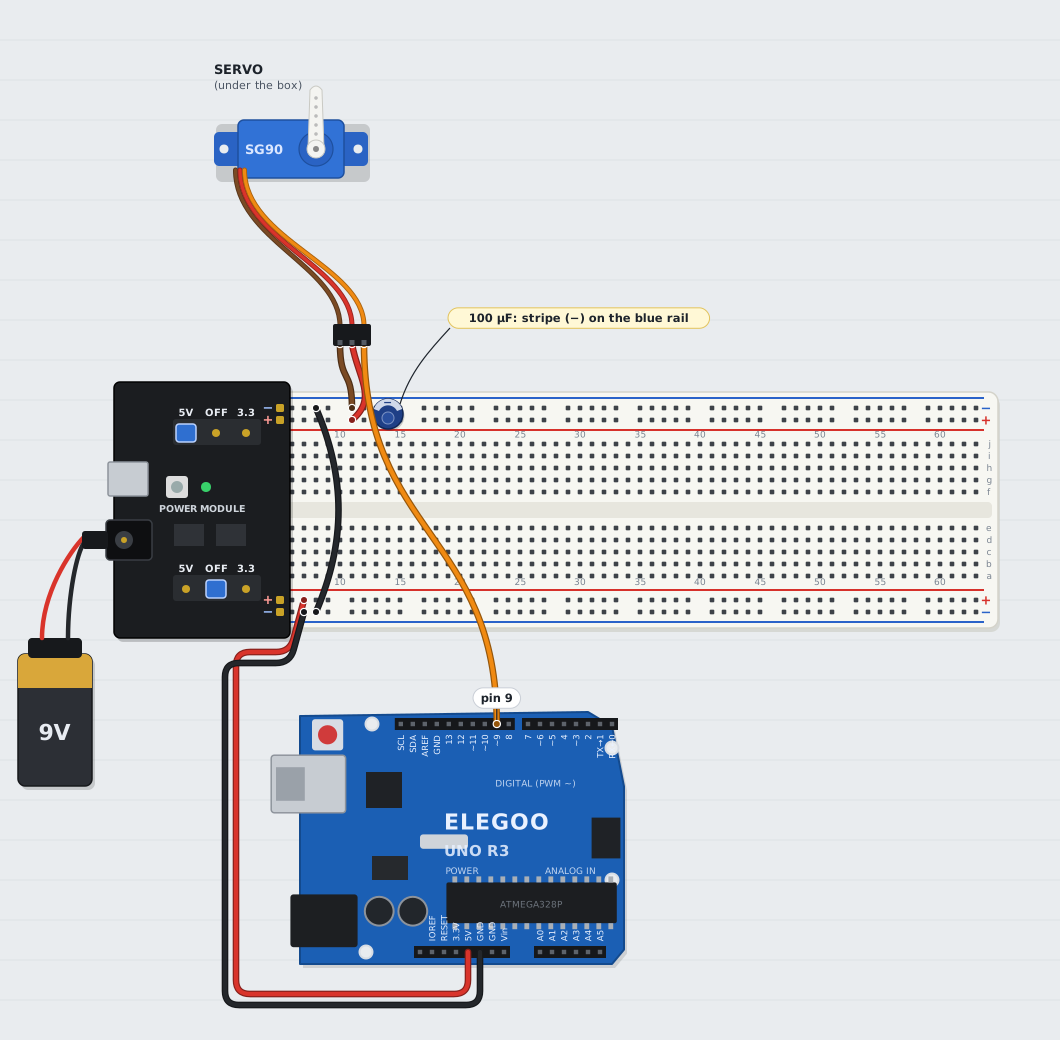
| From | To |
|---|---|
| Capacitor, long leg | top red (+) rail |
| Capacitor, striped leg | top blue (−) rail (polarity matters) |
| Servo brown | top blue (−) rail |
| Servo red | top red (+) rail |
| Servo orange | Arduino pin 9 |
The servo is taped under the box, so its own wire won't reach far. Push three male-to-male jumpers into the holes of its plug (matching brown, red and orange if you have them) and run those to the breadboard.
Motion sensor (GY-521)
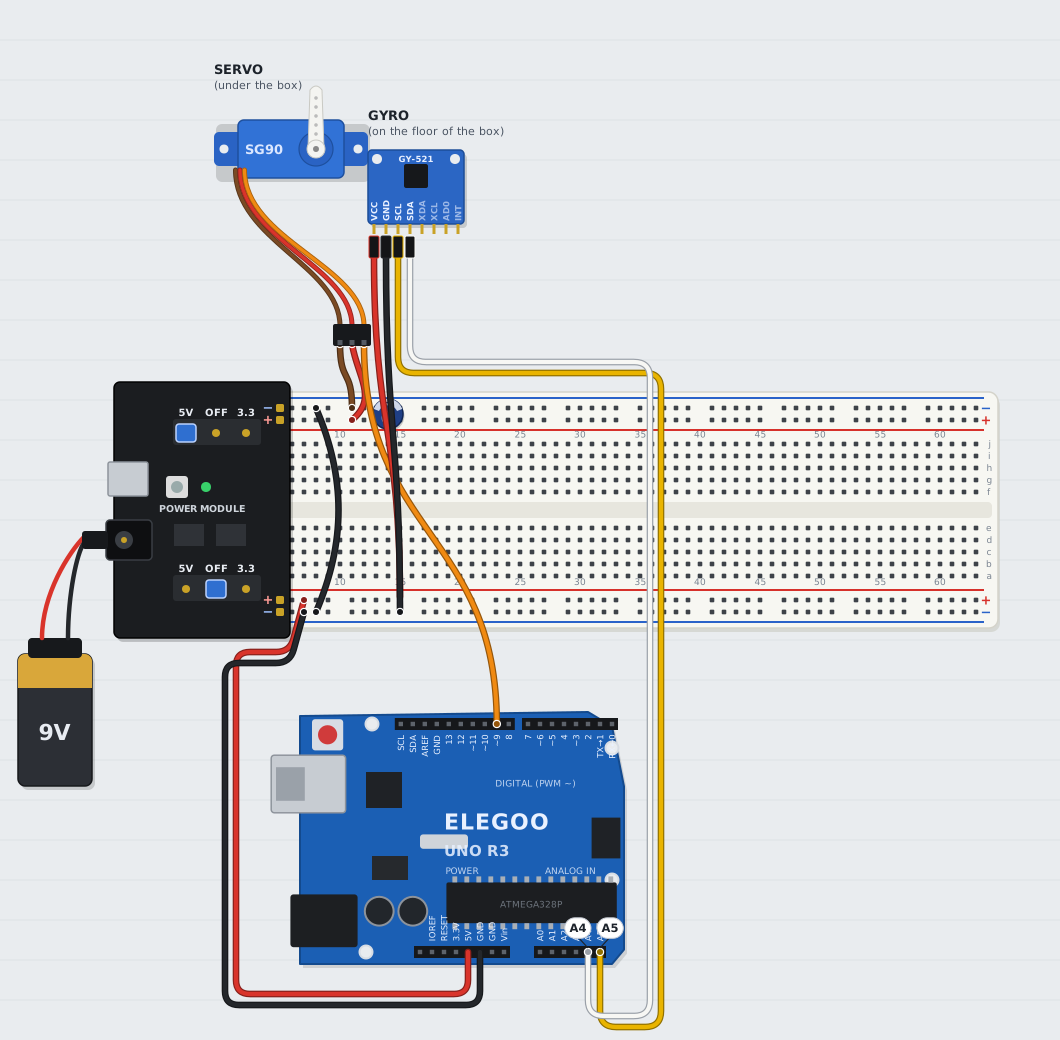
| Board pin | Female-to-male wire to |
|---|---|
| VCC | bottom red (+) rail |
| GND | bottom blue (−) rail |
| SCL | Arduino A5 |
| SDA | Arduino A4 |
| XDA, XCL, AD0, INT | nothing |
This little board feels rotation. ELEGOO ships it with either an MPU-6050 or a QMI8658 chip; the firmware finds whichever you have.
LED face
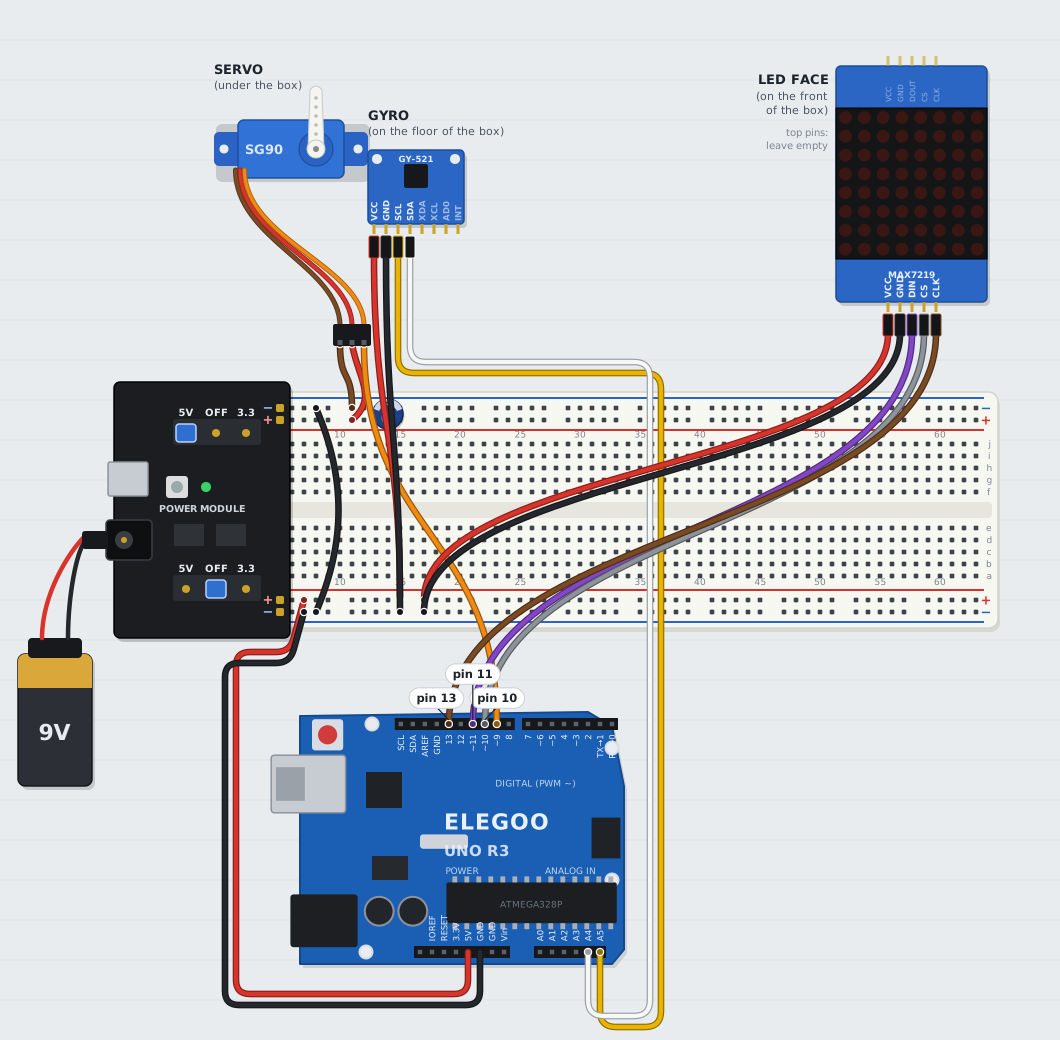
| Matrix pin | Female-to-male wire to |
|---|---|
| VCC | bottom red (+) rail |
| GND | bottom blue (−) rail |
| DIN | Arduino pin 11 |
| CS | Arduino pin 10 |
| CLK | Arduino pin 13 |
Use the five pins on the side marked DIN (not DOUT).
Remote receiver
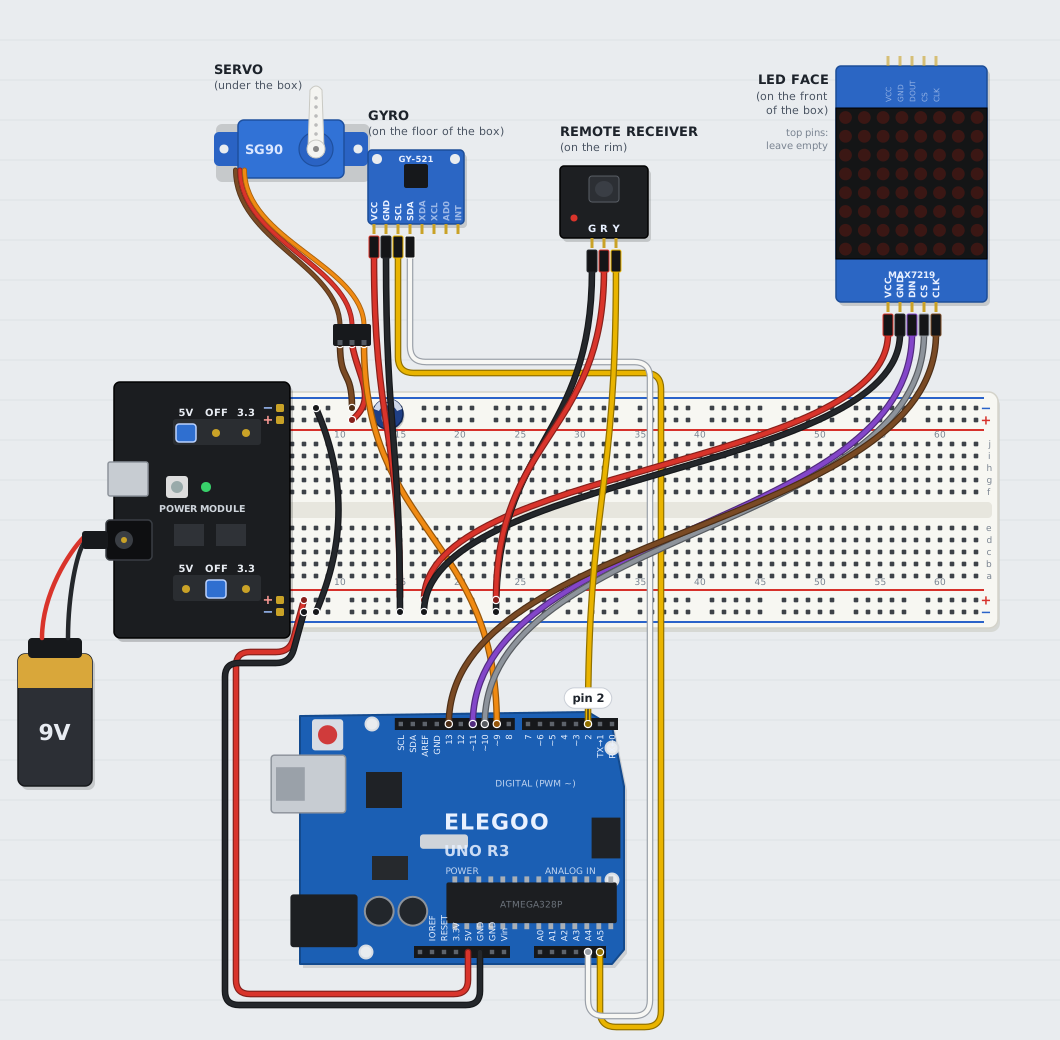
| Receiver pin | Female-to-male wire to |
|---|---|
| G | bottom blue (−) rail |
| R | bottom red (+) rail |
| Y | Arduino pin 2 |
The receiver goes on wires rather than into the breadboard, so that later it can peek over the rim of the box and see the remote.
Buzzer
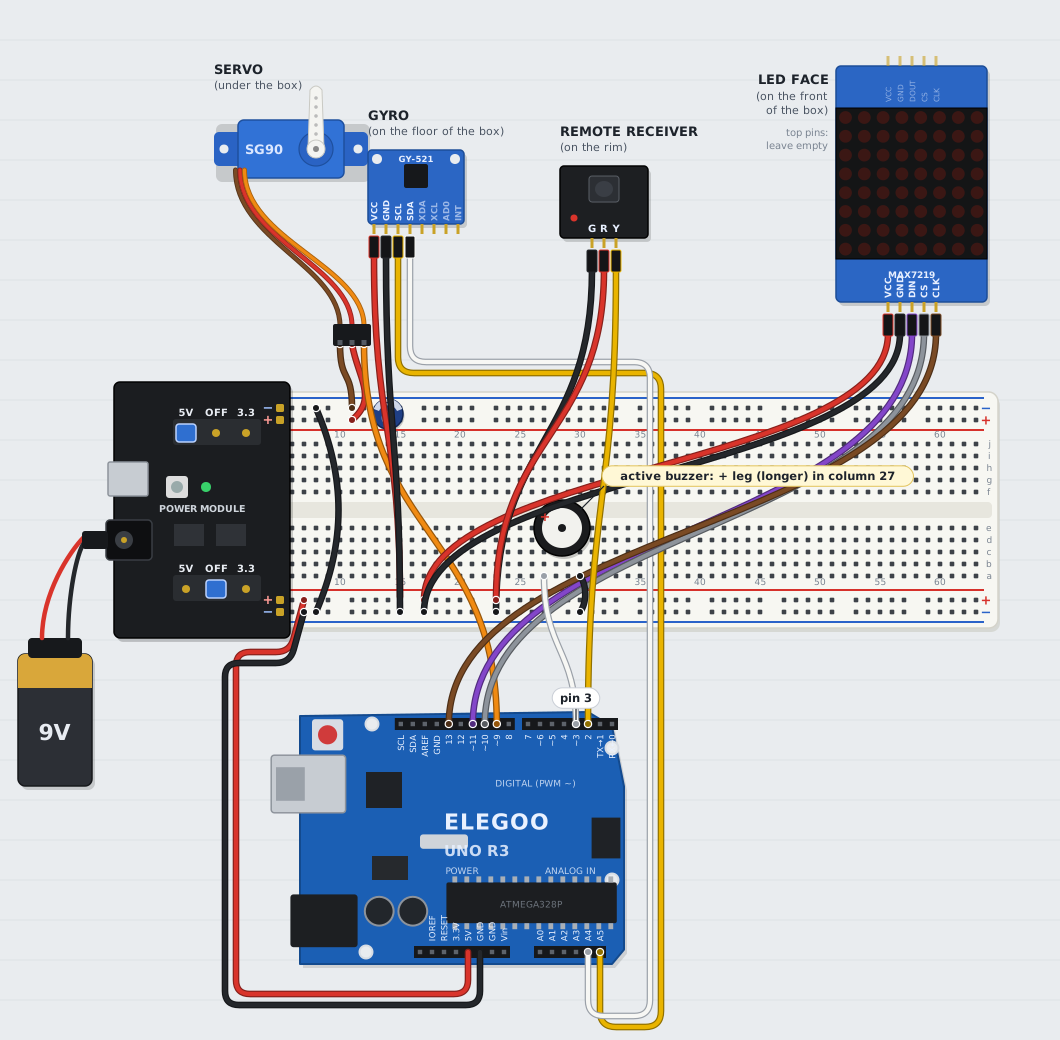
- Use the active buzzer: sticker on top, sealed black bottom. (The passive one shows a green circuit board underneath.)
- Push it into the breadboard. Longer leg (marked +) → Arduino pin 3. Other leg → bottom blue rail.
Check the wiring
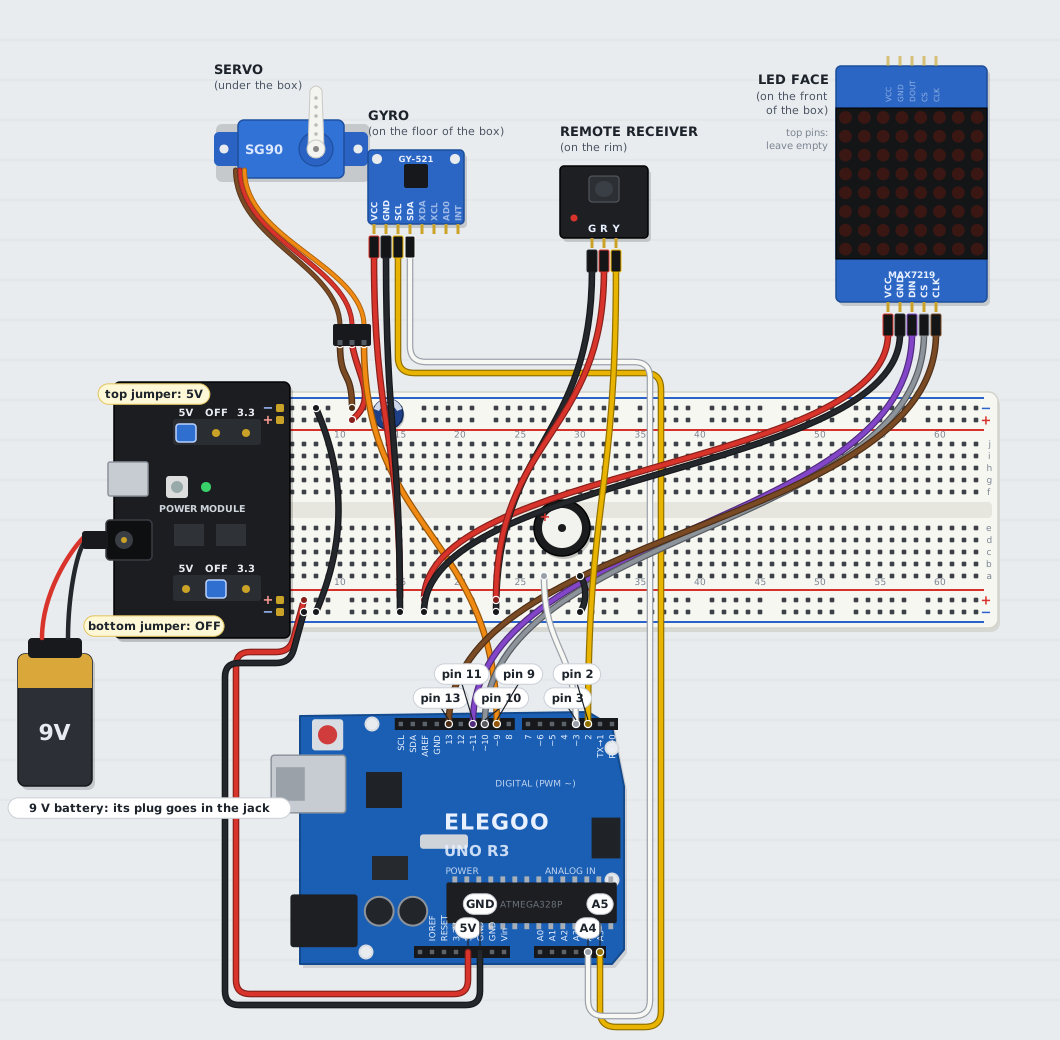
| Arduino pin | Goes to |
|---|---|
| D2 | remote receiver Y |
| D3 | buzzer + |
| D9 | servo orange |
| D10 | LED matrix CS |
| D11 | LED matrix DIN |
| D13 | LED matrix CLK |
| A4 | GY-521 SDA |
| A5 | GY-521 SCL |
| 5V, GND | bottom red and blue rails |
Three things to double-check: the capacitor's stripe faces the blue rail; the power module's + and − line up with the red and blue stripes; and nothing from the bottom rails touches the top red rail, which belongs to the servo alone.
Bring it to life
Everything from here on happens in the Gym, a web app that runs in Chrome. It has three tabs: Dream (training), Exam (testing) and Robot (the USB connection).
Open the Gym
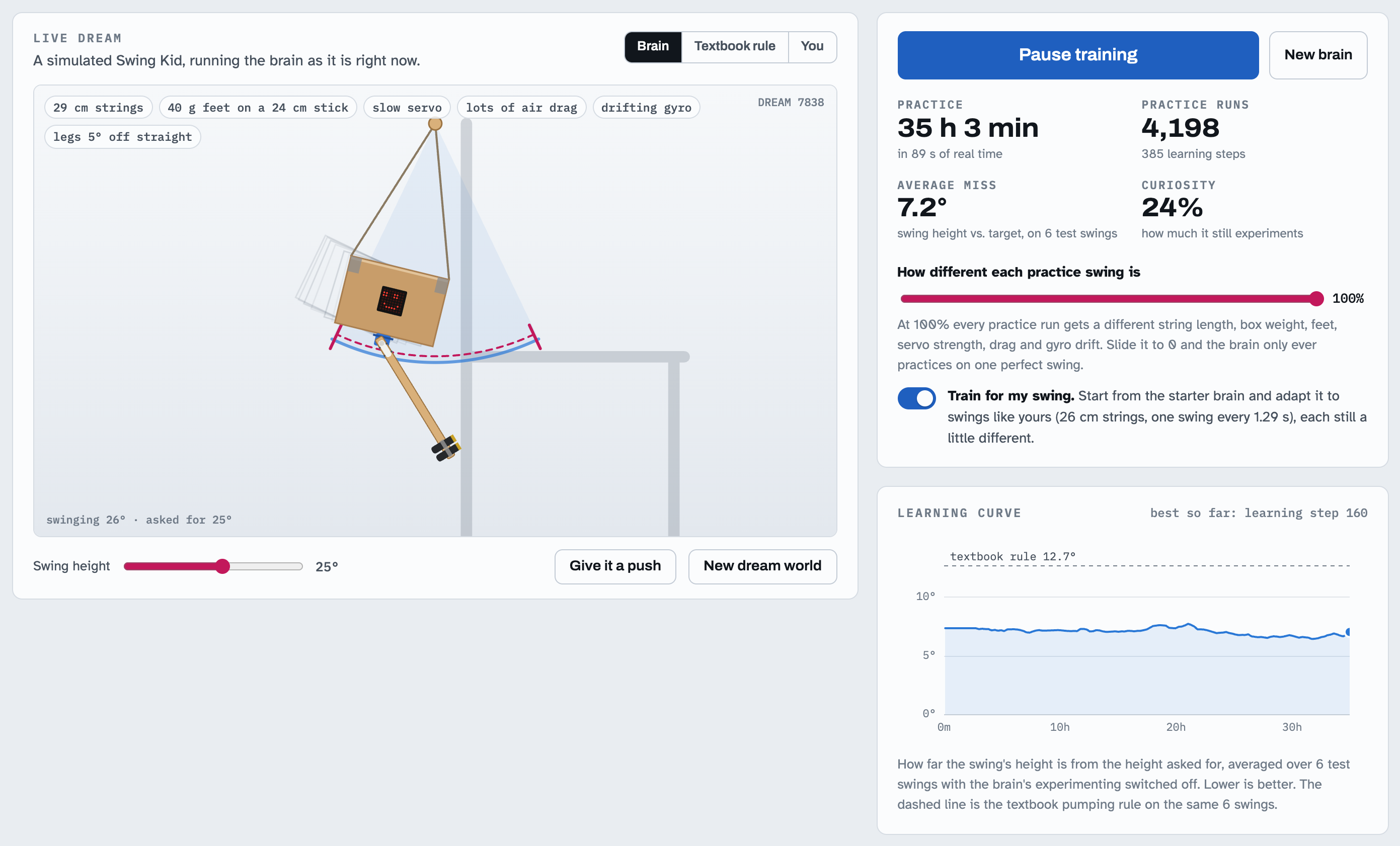
- Open the Gym in Chrome at michaellomuscio.github.io/swing-kid/gym. It can reach the Arduino over USB from there.
- Or run it from your Mac, which also works offline: in Finder, open the
swing-kidfolder and double-click Swing Kid Gym.command. Chrome shows the Gym atlocalhost:8643/gym/; keep the small Terminal window open while you work. (Not on a Mac? Runpython3 -m http.server 8643in the folder.) - No hardware yet? In the Robot tab, Try a virtual one runs every step below against a simulated Swing Kid.
USB needs Chrome or Edge; Safari and Firefox don't support it. A Gym opened from inside claude.ai can train, run exams and drive a virtual robot, but can't reach USB.
Install the firmware
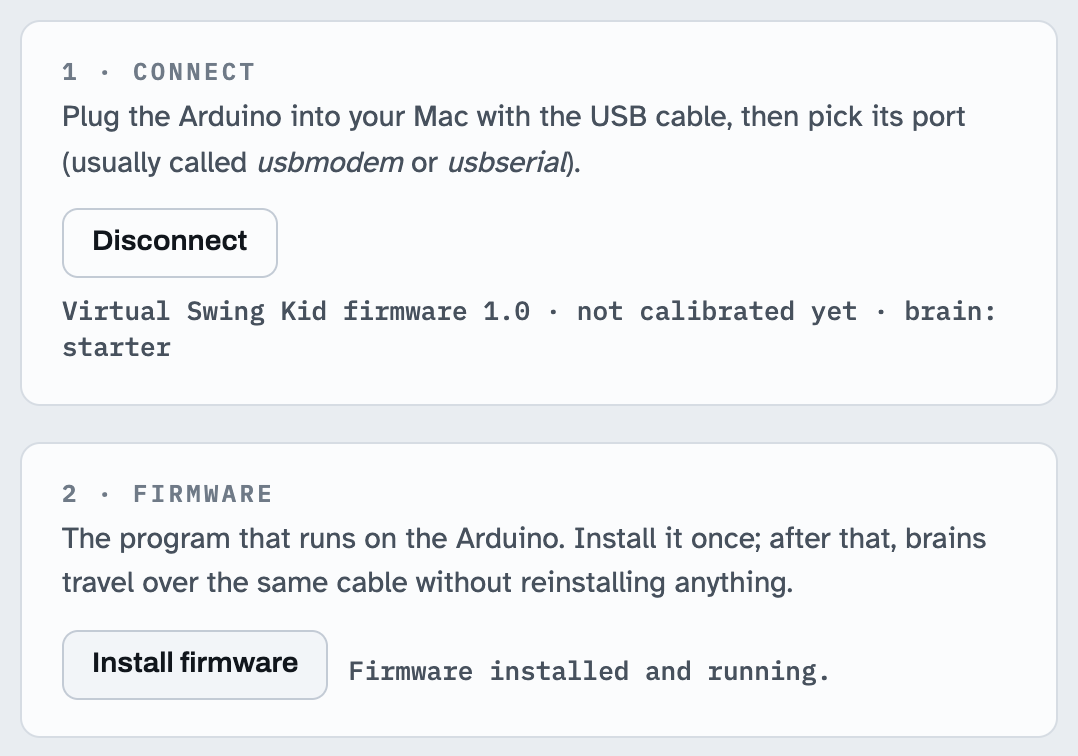
- Plug the Arduino into your Mac (through the USB-C adapter).
- In the Robot tab, click Connect and pick the port named like
usbmodem…orusbserial…. - Click Install firmware. About ten seconds later Swing Kid beeps twice and the status line says hello.
Plan B, the Arduino IDE: open swing-kid/firmware/SwingKid/SwingKid.ino, choose Tools › Board › Arduino Uno and your port, then Upload. No extra libraries are needed.
Test every part
- Plug the 9V battery's plug into the power module's round jack and press its button (its LED lights).
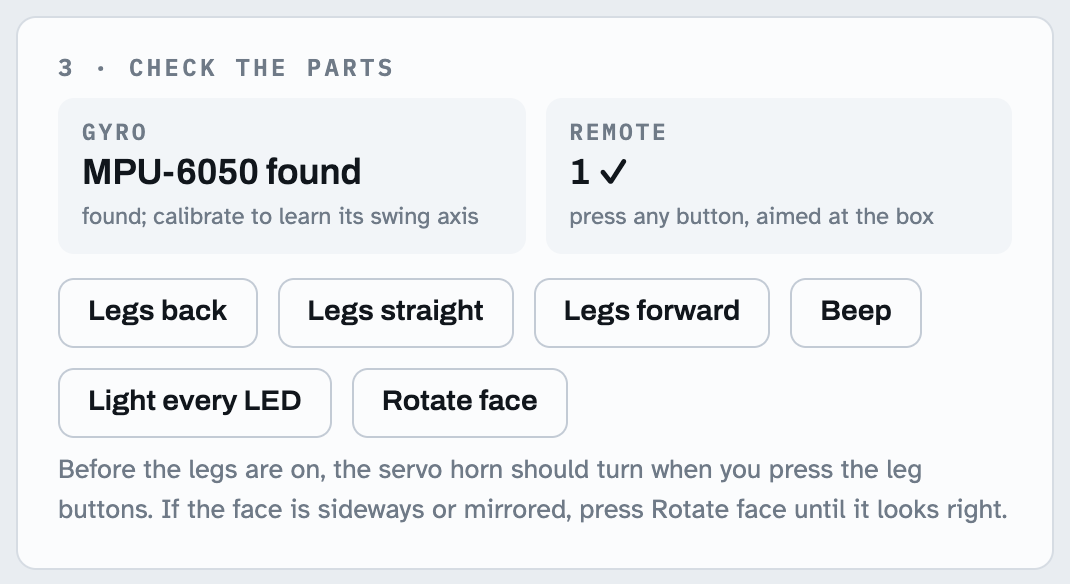
- The gyro says found. Pick up the gyro board and twist it: the reading jumps. Press any button on the remote and watch it appear.
- Click Beep and Light every LED.
- Click Legs forward, Legs back and Legs straight: the servo's shaft turns one way, the other, and back to the middle.
Something silent? See Troubleshooting. Fixing it now, with everything on the table, is much easier than once it's hanging.
Hang it up
Everything goes into the box, the box goes onto the strings, and the legs go on while the servo holds its exact middle. Then Swing Kid calibrates itself.
Load the box
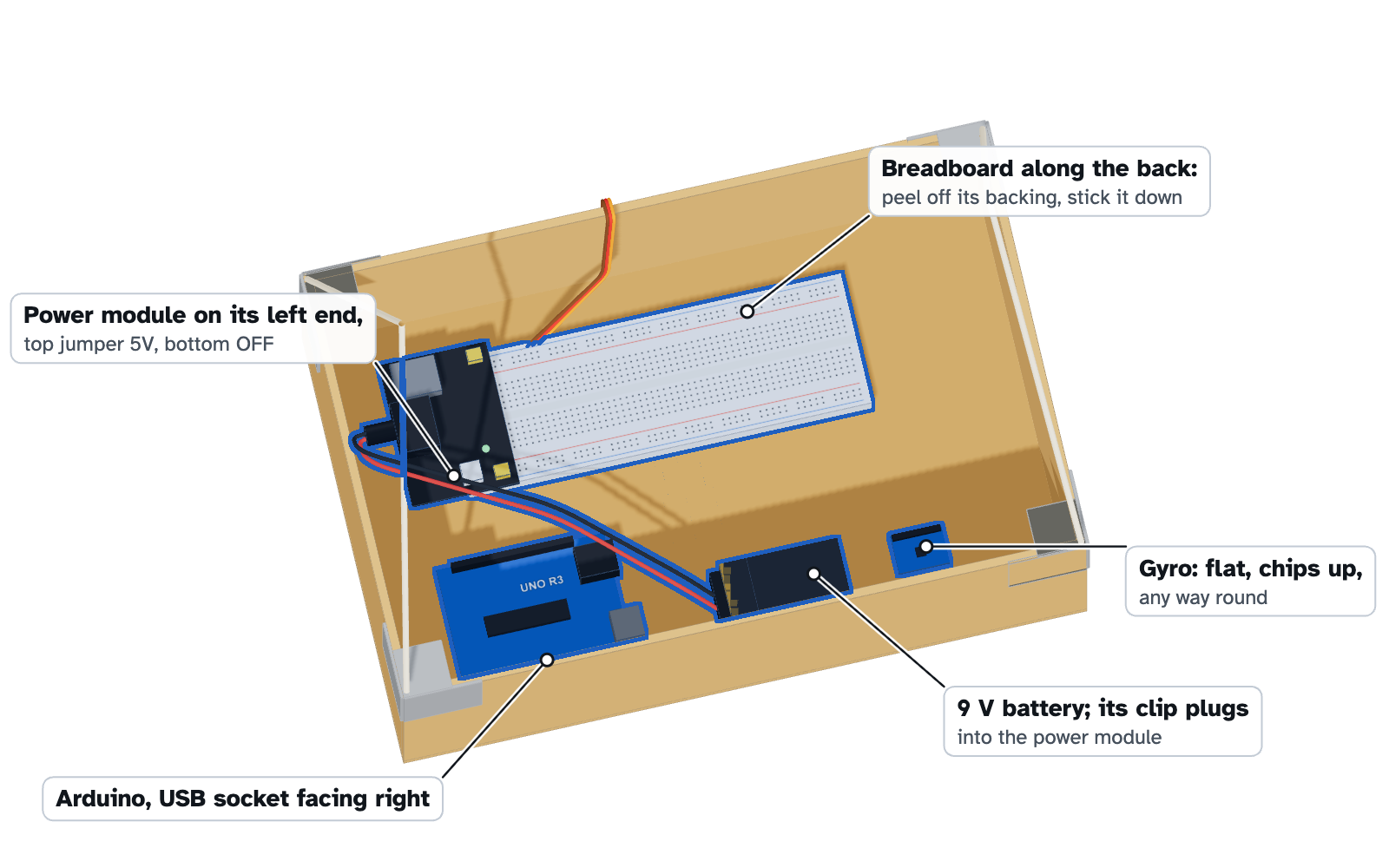
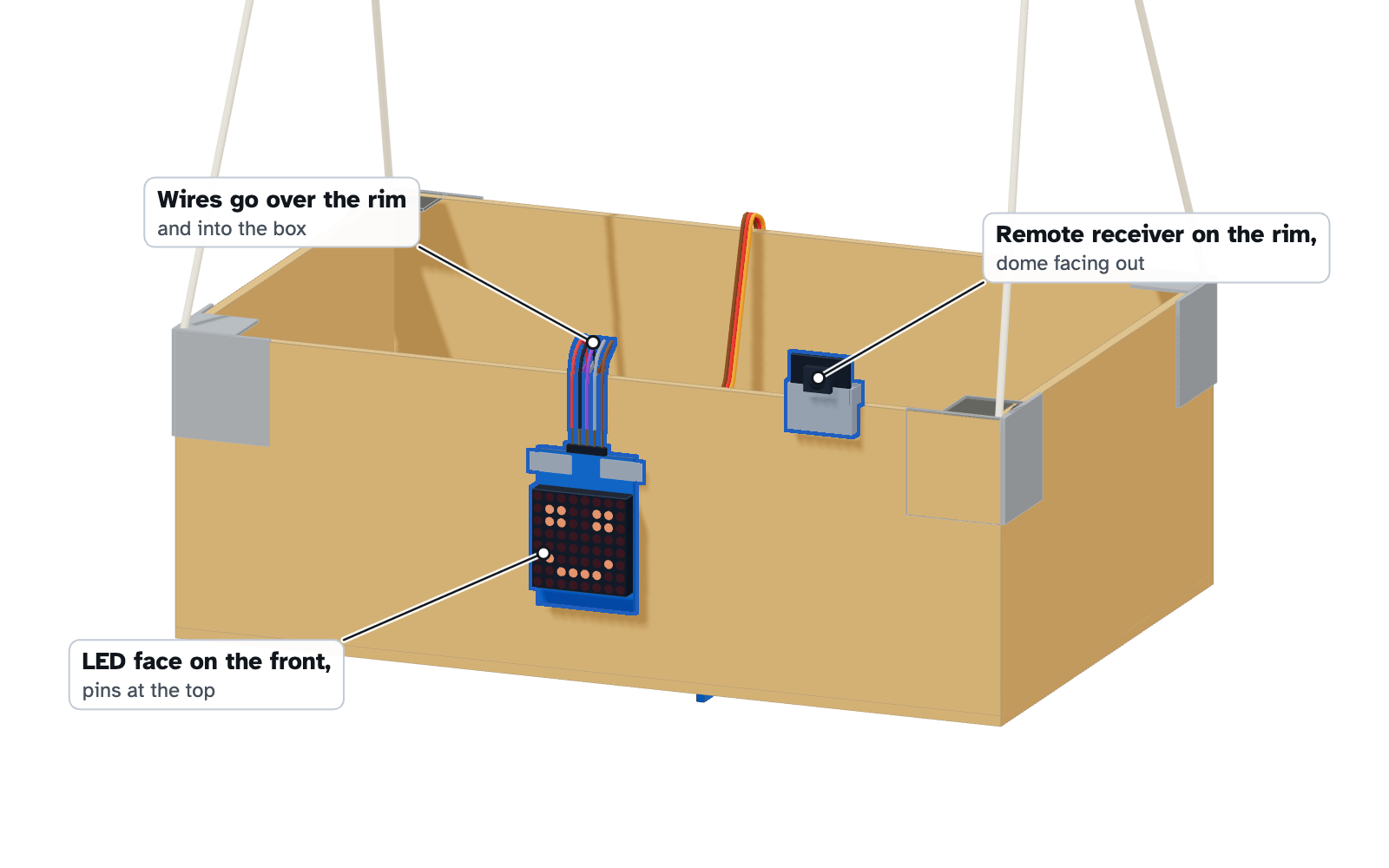
- Unplug the USB cable and the battery. Turn the box right side up.
- Lift the breadboard and Arduino in together. Stick the breadboard to the floor along the back wall (peel the paper off its back, or use tape). Tape the Arduino in front of it and the 9V battery beside the Arduino, lying flat.
- Tape the gyro board flat on the floor of the box, chips facing up. Which way it points doesn't matter.
- Tape the LED matrix to the outside of the front wall, LEDs facing out, its pins at the top so the wires go straight over the rim.
- Tape the remote receiver on top of the front rim, its dark dome facing forward.
- Run the servo's wires up the back of the box and over the rim.
Hang the box
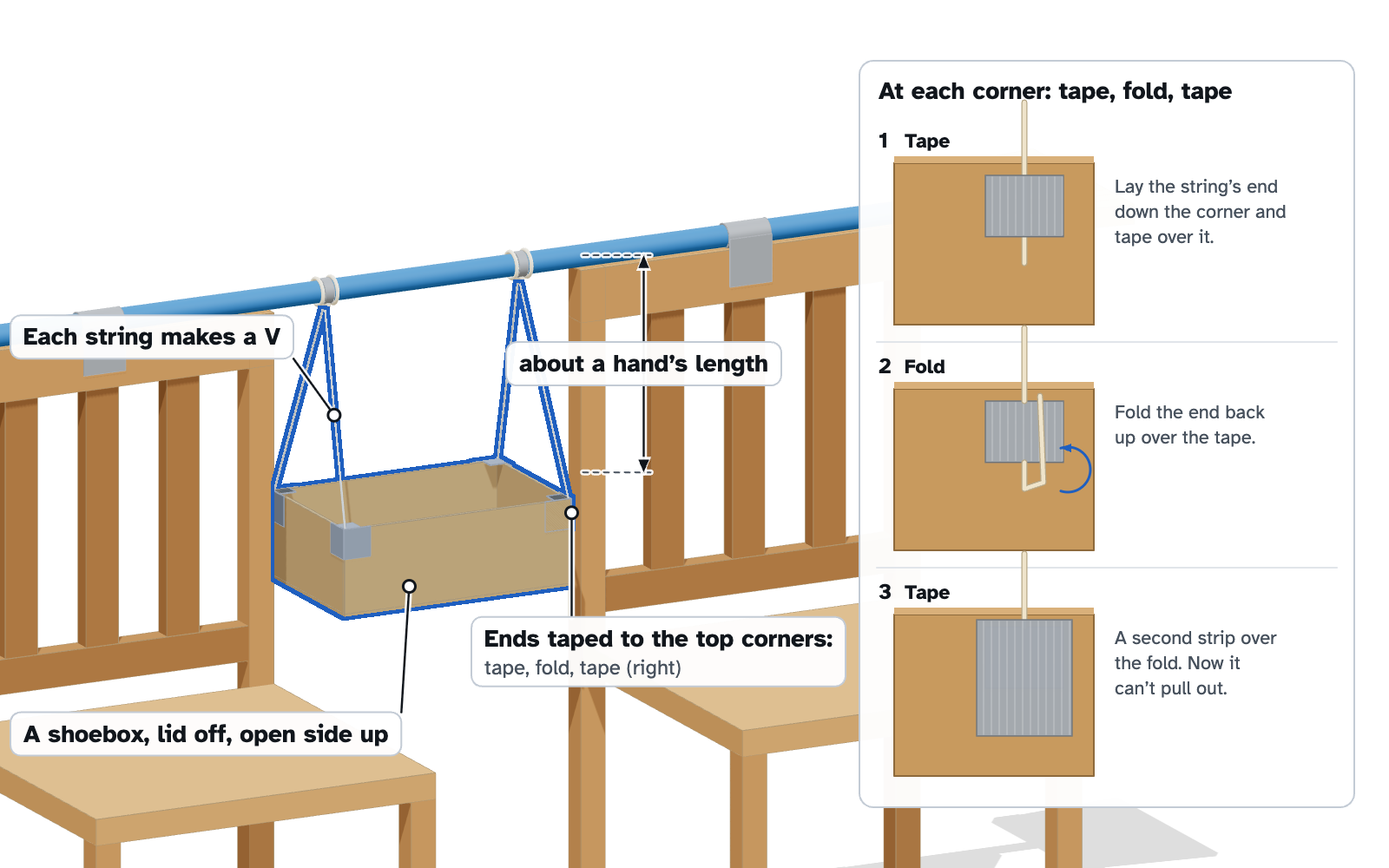
- Hold the box under the broom, face toward you, about a hand's length below the handle.
- Take the left string's two ends. Tape one to the box's front-left top corner and the other to its back-left top corner. Do the same on the right. Each string now makes a V.
- For each end: tape it on, fold the end back over the tape, and tape again. A folded end can't slip out.
- Let go. If the box tilts, peel one end up, slide the string a little, and press the tape back down.
Why Vs: seen from the side, each V is a triangle, so the box can't rock on its strings; box and strings swing as one piece. And why so close to the broom? A swing pumps best when its heavy part is high and the kicking weight is low. Part 6 shows the math.
The legs
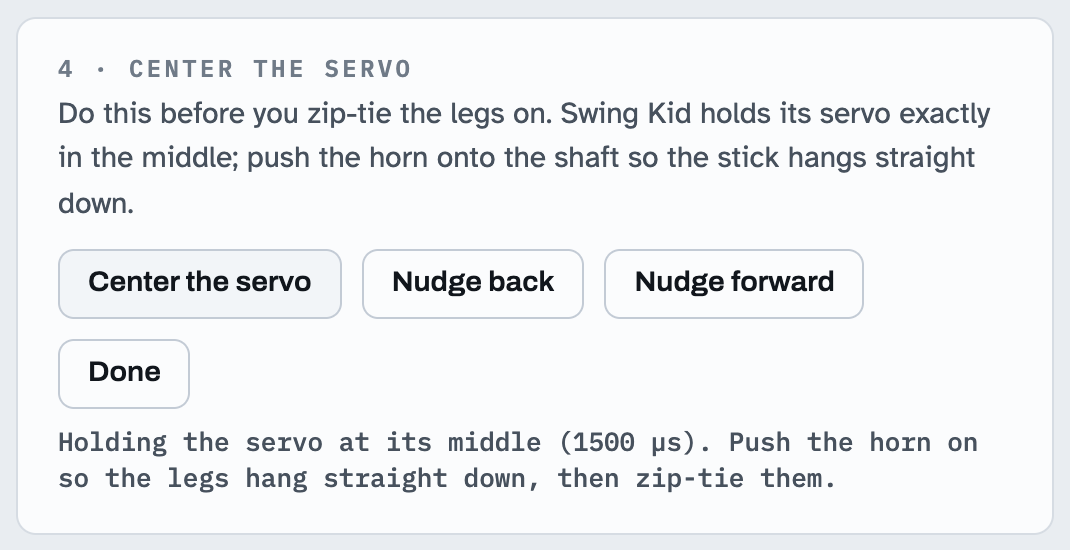
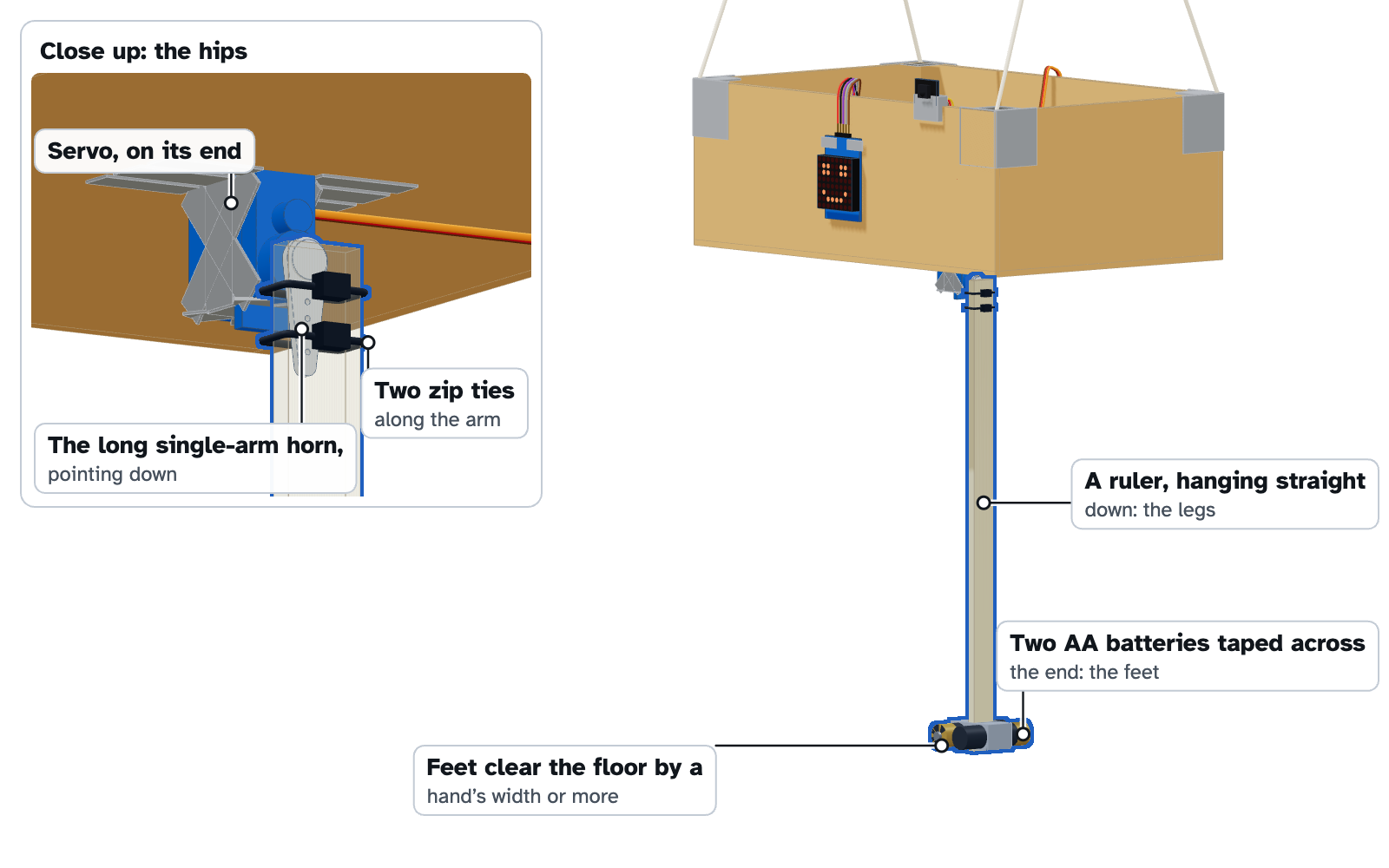
- Plug the USB cable and the battery back in and press the power module's button. In the Gym, click Center the servo. The servo holds its exact middle.
- Push the long single-arm horn onto the servo's shaft, its arm pointing as close to straight down as its teeth allow.
- Lay the stick along the arm with the stick's top end at the round hub, so nothing sticks up toward the box. Strap it on with two zip ties through the arm's holes, one near the hub and one near the arm's tip. Pull them tight and snip the tails.
- Tape two AA batteries across the bottom end of the stick: the feet.
- The feet should clear the floor by at least a hand's width. If they don't, retie the strings higher.
The horn's tiny screw (in the servo's bag) locks it onto the shaft. Worth it if you have a small screwdriver.
The cable
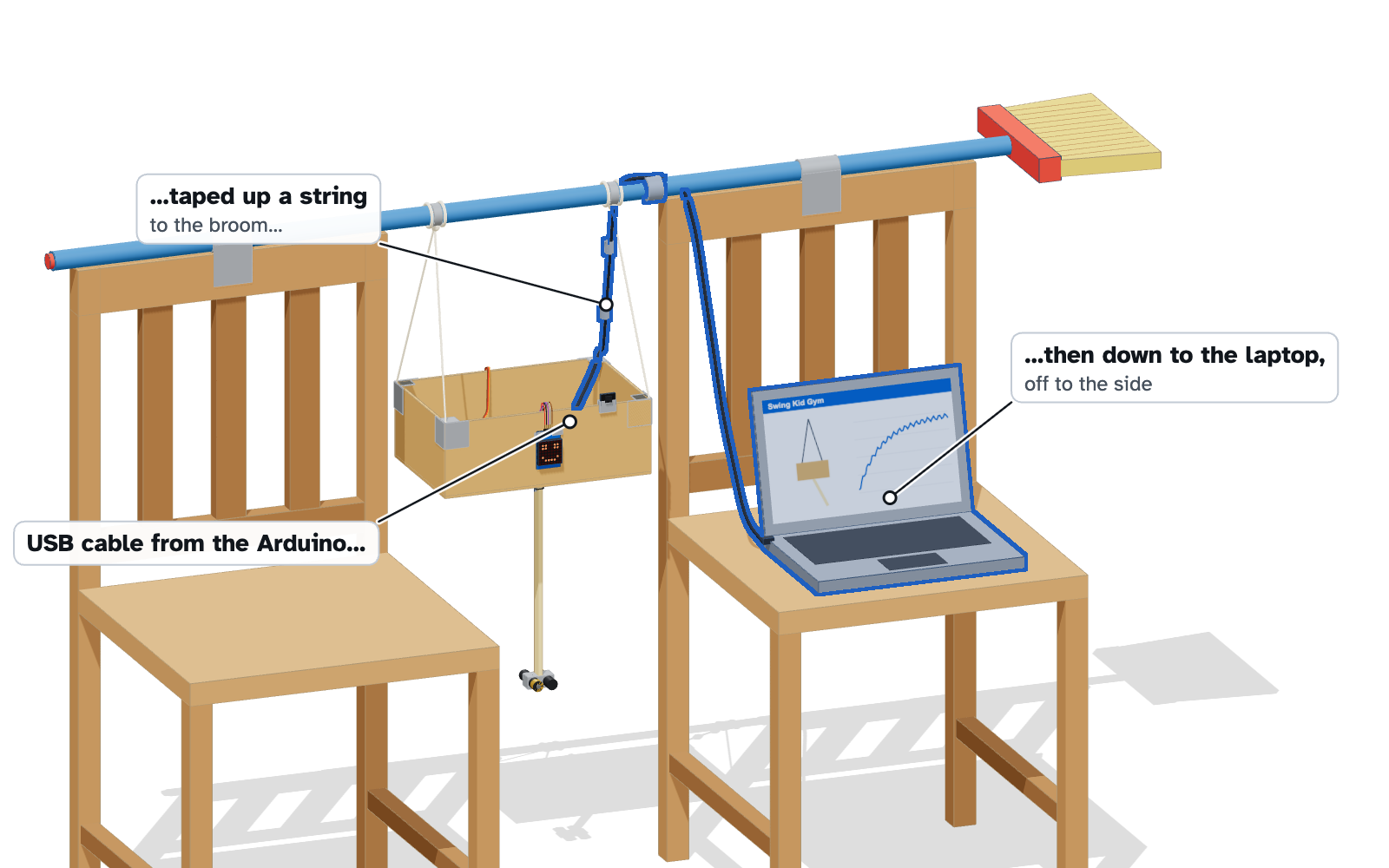
- Run the USB cable from the Arduino up along the back-right string to the broom, with two small pieces of tape.
- From the broom, let it hang down to your laptop, set on a chair or table off to the side, out of the swing's way.
- Leave a little slack between the box and the string so the cable never tugs.
The cable now hangs from near the pivot, where it barely affects the swing. The dream simulates some cable tug anyway, just in case.
Calibrate
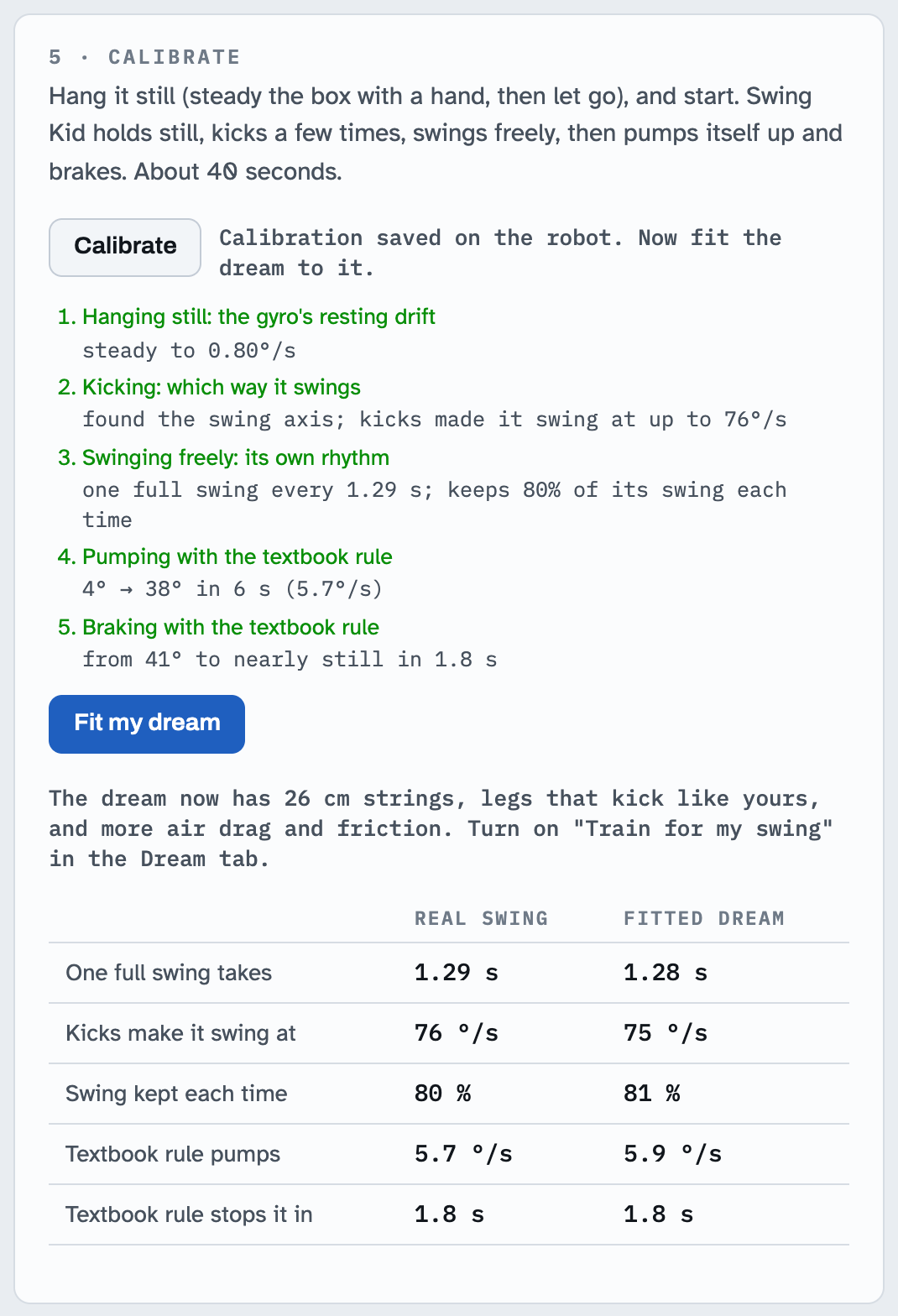
- Steady the box with your hand, let go gently, and click Calibrate (or press ST/REPT on the remote). It takes about 40 seconds.
- Hanging still: it measures the gyro's resting drift. Kicking: five seconds of kicks. The direction the box rotates around tells it how the gyro sits, and which way the box flinches on the first kick tells it which way is which.
- Swinging freely: legs still, it times its own swing and watches it die down. Pumping and braking: it tries the textbook rule both ways to see how strong its legs are. It usually ends with a little leftover swing; that's normal.
- Then click Fit my dream. The Gym adjusts its simulator until the simulated swing does what your real one just did.
If it says the kicks didn't make it swing, check that the feet are on, the battery is plugged in and the power module is on, then calibrate again.
Teach it
Swing Kid can already swing with the starter brain I trained, which practiced the equivalent of about five days of swinging. Watch a new brain learn from nothing, then adapt the starter to your exact swing, examine it, and send over whichever does better.
Train a brain
First, watch one learn from scratch.
- In the Dream tab, click New brain, then Start training. Sixty-four simulated Swing Kids, each built a little differently, practice at once with a brain that starts out knowing nothing.
- Watch the little swings. At first the legs flail and nothing much happens. Then a rhythm appears: kick, tuck, kick. That's the moment it figured out pumping. Braking comes later.
- Watch the curve: how far, on average, each swing is from the height it was asked for. Within a few minutes it drops below the textbook rule's dashed line. A brand-new brain needs a long practice to match the starter brain, which practiced the equivalent of about five days of swinging.
Then train one for your swing.
- Turn on Train for my swing and click Start training. This starts from the starter brain and lets it practice on dream swings fitted to yours, so it only has to learn your swing's quirks.
- Two or three minutes is plenty. The Gym keeps the best brain it has seen, and the starter counts as the one to beat.
The exam
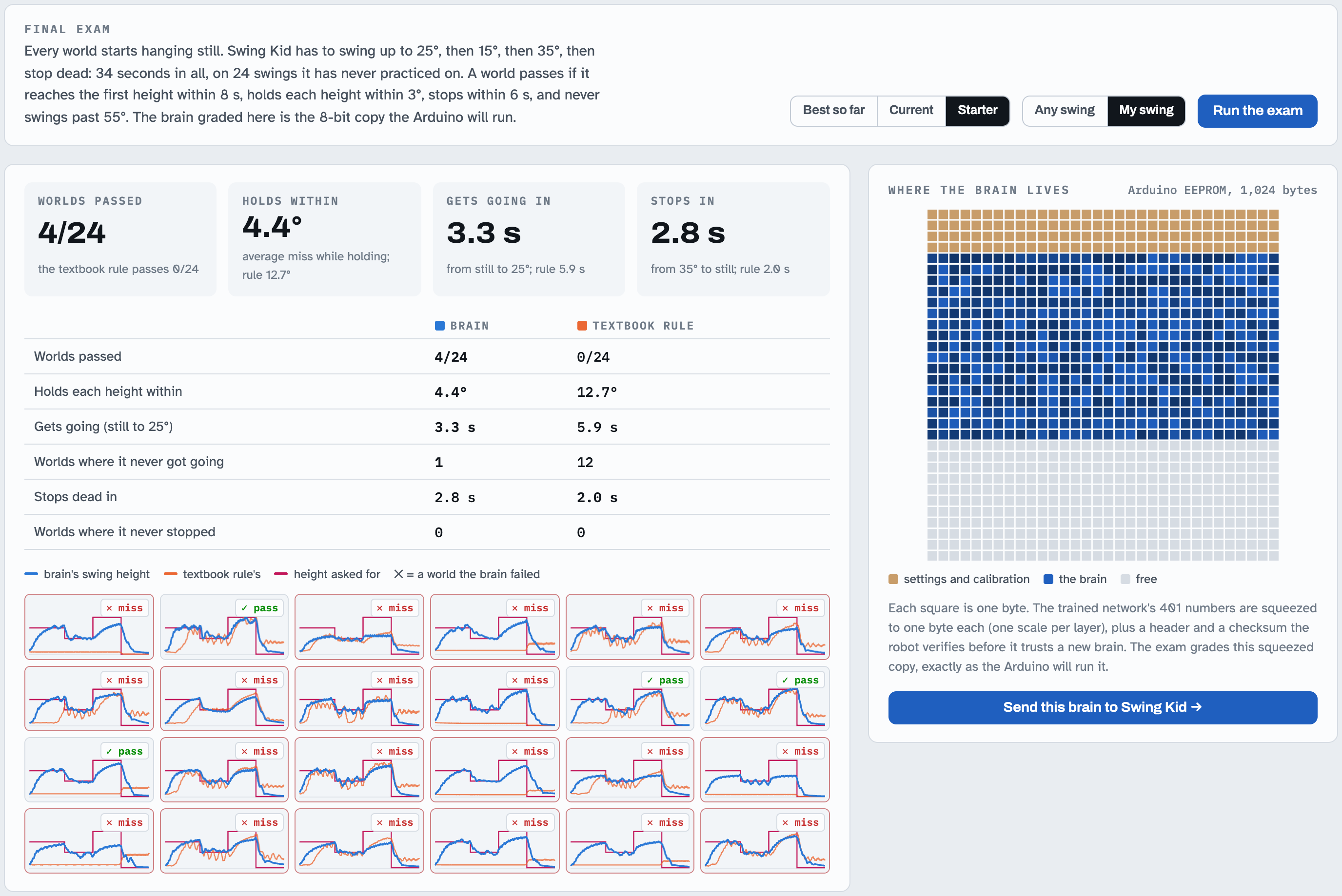
- Open Exam and click Run the exam. Every exam swing starts hanging dead still. It must reach 25°, drop to 15°, climb to 35°, then stop.
- It's graded on the 544-byte, 8-bit copy the Arduino will run, next to the textbook pumping rule. The rule struggles to start from dead still, because there's no swing yet to time its kicks against. Watch how the brain does it.
- Pick Best so far, then Starter, and run the exam on My swing for each. If the trained one passes more swings, send it. If not, the starter brain is already on the robot.
Send the brain
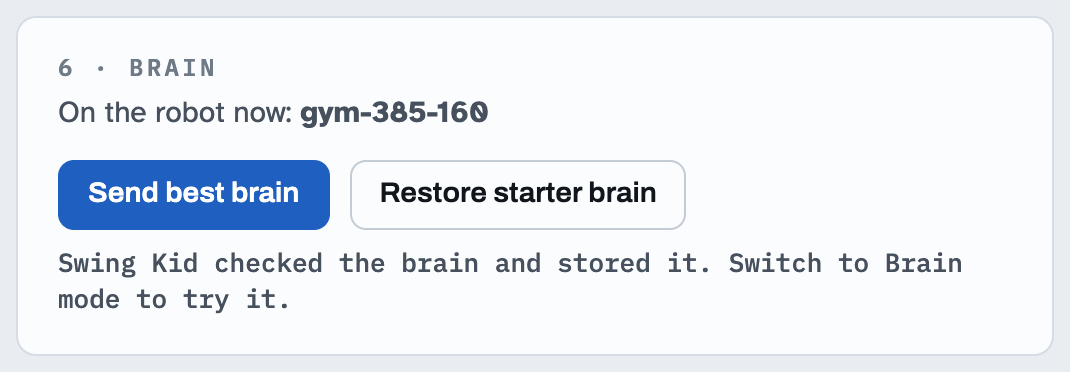
- In Robot, click Send best brain. The Arduino checks every piece and stores the brain in memory that survives power-off.
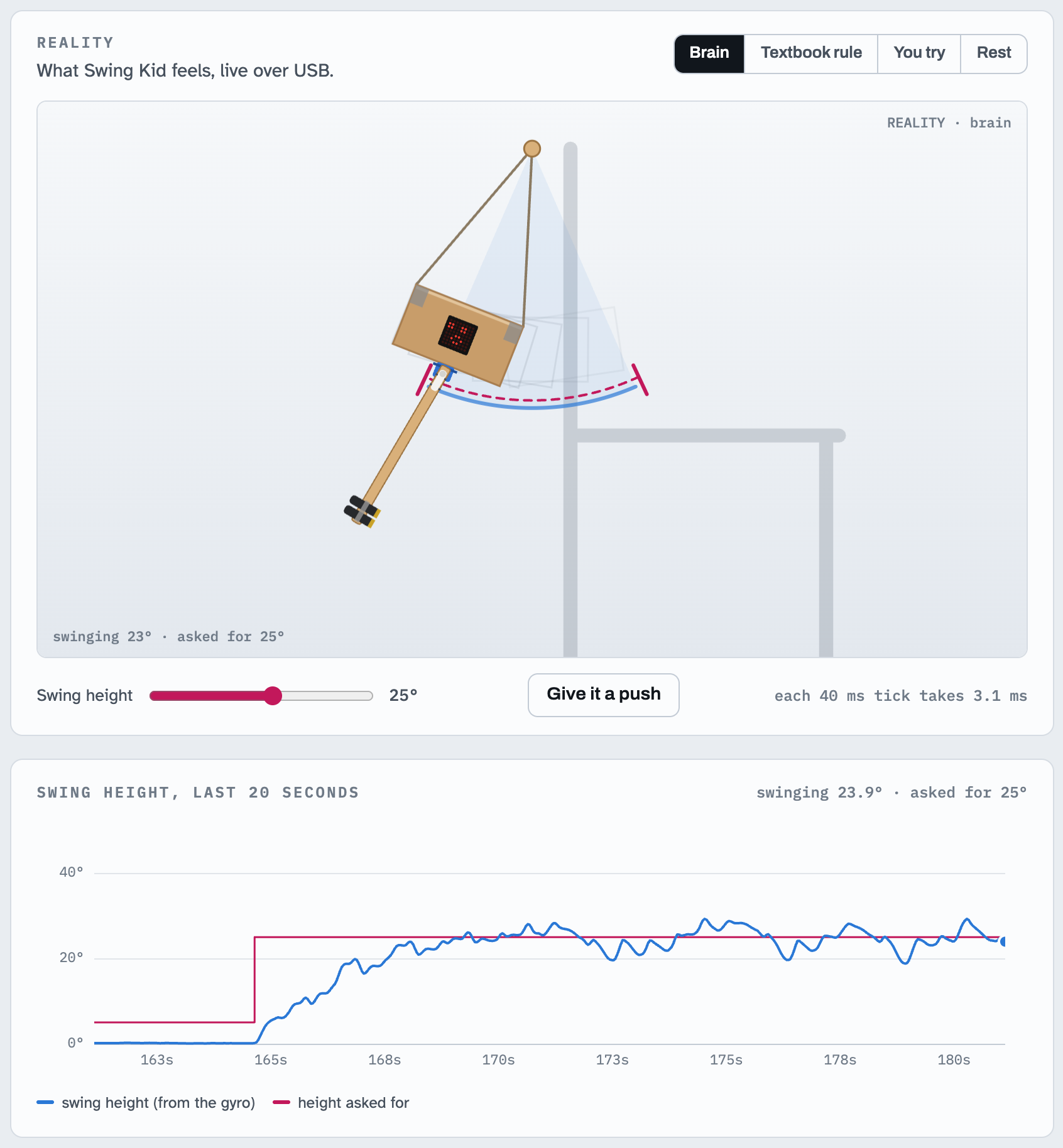
- Click Brain, set the target with the slider, and step back.
Play with it
| Button | What Swing Kid does |
|---|---|
| POWER or ▶❚❚ | start swinging, or rest (the first time, it calibrates) |
| 1 … 9 | swing to 5°, 10°, … 45° |
| 0 | stop: brake to hanging still |
| ▲ ▼ | 5° higher or lower |
| FUNC/STOP | switch between its brain and the textbook rule |
| VOL+ VOL− | trim the legs if they don't hang quite straight |
| ◀◀ ▶▶ | face, a tiny swing, or the brain's neurons on the LED matrix |
| EQ | buzzer on or off |
| ST/REPT | calibrate |
Give it a shove while it's holding a height, or ask for 0 in the middle of a big swing. Unplugged from the Mac it keeps its brain and calibration: plug its USB cable into a phone power bank in the box, switch on the power module, and press POWER on the remote.
You try
- In Robot, click You try. Now the ← and → keys (or the slider) move the legs. You're the brain.
- From hanging still, try to get it to 30° and hold it there. Then try to stop it dead.
- Then click Brain and watch how it times the same kicks.
The safety brake still works: above 55° the legs take over and slow it down, whoever is in charge.
Dream vs reality
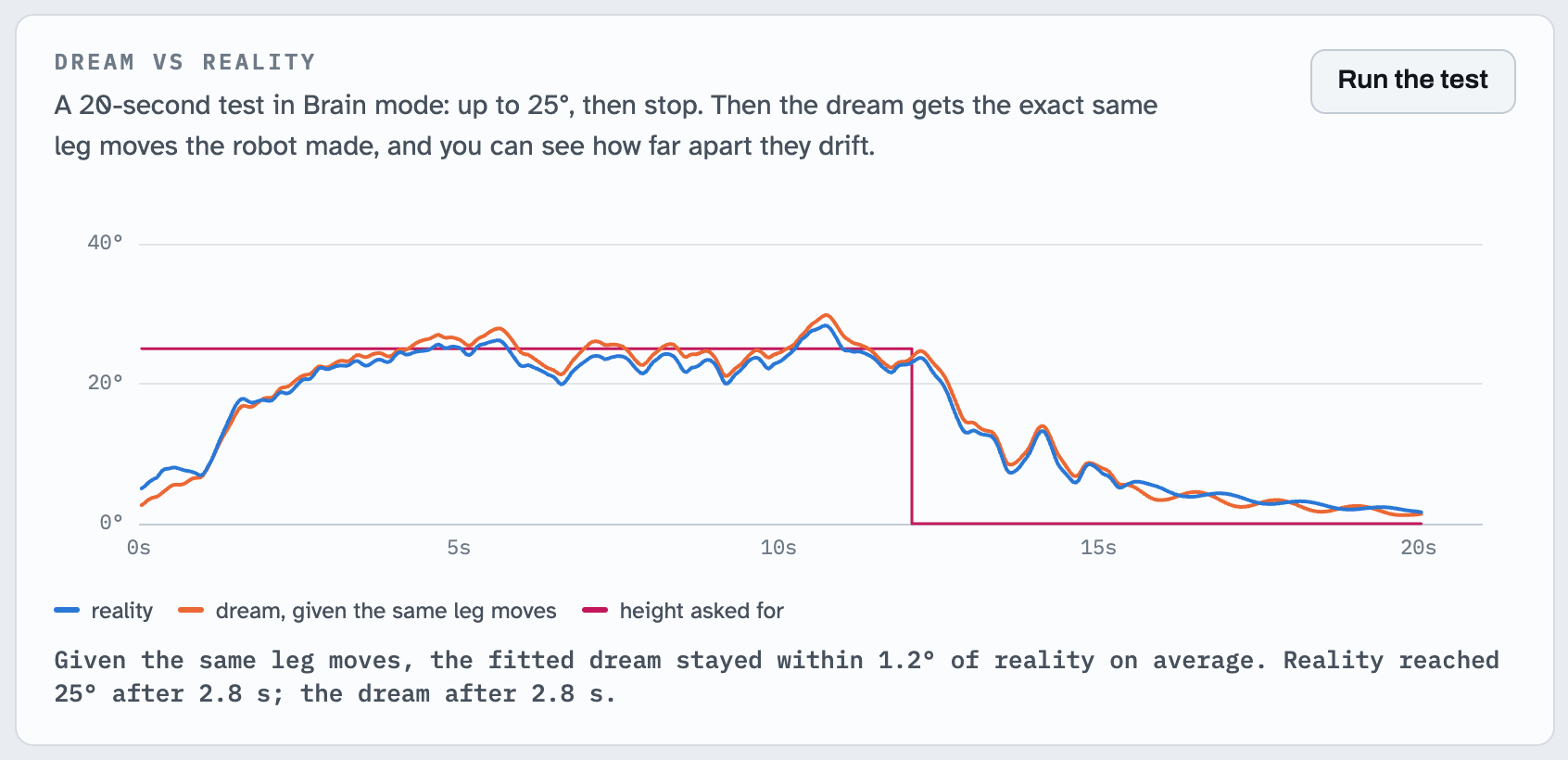
- In Robot, with Brain mode on, click Run the test under Dream vs reality. Swing Kid swings up from still for real, then the Gym replays every leg command it sent in the fitted simulator and draws both swings.
- The space between the two lines is the reality gap. A small gap means the dream was a good model of your box, strings and broom.
The screenshot above comes from the virtual robot, whose physics are deliberately a little different from the dream's. Yours will tell you how good the simulator really is.
Experiments
- Skip the randomization. Turn off Train for my swing, slide How different each practice swing is to 0%, click New brain, train, and send. A brain that only ever practiced in one perfect dream often falls apart in reality.
- Change its body. Add a third battery to the feet, or hang the box lower. Calibrate, fit, and see whether the brain copes, or train a new one.
- Watch it learn from scratch. Click New brain and keep your eyes on the little swings. You'll see the moment the rhythm appears.
- Brain vs rule. Run the dream-vs-reality test in Brain mode and again in Textbook rule mode, and compare.
Troubleshooting
| What you see | Usual cause and fix |
|---|---|
| No port to pick in Connect | Try another cable or adapter (some USB-C adapters are charge-only). Use Chrome; Safari has no USB support. |
| Connected, but no hello | Firmware not installed yet: click Install firmware. Or the Arduino IDE's Serial Monitor is open and holding the port; close it. |
| Install firmware says it can't reach the bootloader | Unplug and replug the Arduino, reconnect, try again. Still failing: use Plan B (Arduino IDE). |
| Gyro: not found | SDA and SCL swapped (SDA is A4, SCL is A5), or VCC or GND loose. |
| Servo doesn't move, or twitches and the Arduino resets | Battery unplugged or power module off; top jumper not on 5V; capacitor backwards; servo red wire on the bottom rail. A tired 9V battery also makes the legs weak: try a fresh one. |
| Calibration: "the kicks didn't make it swing" | Feet missing or too light, servo not powered, or the horn slipping on the shaft (push it on firmly; add its screw). |
| Calibration: "couldn't time the swing" | Something is rubbing (the cable, a wall, the chair), or the strings are slack. The box must swing freely for 8 seconds. |
| Remote does nothing | Y must go to pin 2; aim at the receiver's dome; replace the remote's coin cell (pull the plastic tab out first). |
| LED face is sideways or upside down | Click Rotate face in the Gym's Check the parts panel until it looks right (it remembers). |
| It swings, but never quite reaches the height you ask for | Heavier feet (a second battery), a fresh 9V battery, or hang the box closer to the broom. Calibrate and fit again, then train for your swing. |
| The legs hang a little crooked | Press VOL+ or VOL− on the remote to trim them until they hang straight. |
How it works, for the curious
The real equations behind the simulator, the learner and the robot.
The physics in the dream
Put the pivot (the broom) at the origin. Let θ be the swing angle of the box and its strings (they move as one rigid piece), and φ the angle of the legs relative to the box, which the servo sets. The box has mass M, its center of mass is L below the pivot, and it has moment of inertia Ib about that center. The servo's shaft is h below the pivot. The legs have mass m, their center of mass is d from the shaft, and their moment of inertia about the shaft is Il.
The simulator integrates this every 2 ms along with the second Euler–Lagrange equation, the one in φ. The servo appears there as a motor: full torque until it's within a few degrees of its target, less the faster it already spins (back-EMF). It also has dead time, a deadband and friction. The gyro has drift, noise and a scale error. The USB cable pulls and rubs.
Why kicking pumps, and why the legs are long
For small angles, the swing equation becomes a pendulum driven by the legs:
Two effects fight. Swinging the legs one way twists the box the other way (the reaction), and it also shifts the weight sideways (gravity). They cancel exactly when the legs' weight sits at depth ℓ, the center of oscillation, and there kicking does nothing at all. That's why Swing Kid hangs close to the broom with long legs: the box (most of the mass) keeps ℓ short, and the feet sit far below it. In the simulator, moving the same box and feet to the end of long strings with short legs made pumping several times weaker. Driven at resonance, the amplitude grows by about π·(forcing)/K radians per swing. For the recommended build (a 330 g box whose center hangs a hand's length below the broom, and 57 g of stick and batteries reaching 26 cm below the servo), ℓ ≈ 40 cm while the legs' weight sits about 60 cm down. Kicking ±60° could then add up to about 10° per swing. The servo's limited speed and the air take some of that back.
What the brain sees and does
The gyro is read every 10 ms. The firmware projects the reading onto the calibrated swing axis, integrates it, and lets the result slowly forget, so drift can't pile up:
How high this swing will go comes from energy. For a pendulum, ½θ̇² + ω0²(1 − cos θ) is constant, and at the top of the swing θ̇ = 0, so
The brain is a 6 → 16 → 16 → 1 network with tanh neurons. Its inputs are the angle and the speed divided by ω0 (so a longer or shorter swing looks the same to it), its last leg command, where the legs probably are, how far the swing is from its target, and the target itself, all scaled by 0.6 rad. Its output, between −1 and 1, is the leg angle in units of 60°.
How it learns: PPO
Each practice step, 40 ms long, earns a reward for swinging at the height asked for, with small costs for jerky or extreme leg commands and a big one for going too high:
Proximal Policy Optimization nudges the brain toward actions that turned out better than a second network, the critic V, expected. It never changes the policy too much at once:
The critic is allowed to peek at the dream's hidden physics: the true angle, the true leg position, how heavy the feet really are. That makes its estimates better. The brain that ships to the robot only ever sees the gyro. That split is called an asymmetric actor-critic. Training runs 64 worlds in parallel, 8,192 decisions per learning step.
Fitting it into 1 KB
Each layer's weights are stored as signed bytes with one scale per layer: w ≈ s·q, with q = round(w/s) and s = max|w|/127. A neuron computes b + s·Σqkxk. The whole brain is 544 bytes, including its header and CRC-32 checksum, and the exam grades exactly this copy.
Calibration without knowing how anything is mounted
While the legs kick, the gyro readings ωk (drift removed) spread out mostly along the swing axis. Twisting about the strings isn't swinging, so the firmware first removes the vertical direction û (measured while hanging still), then takes the principal direction of what's left:
The sign comes from the very first kick, from still. Moving the legs one way makes the box flinch the other way, so s = −sign Σk(n·ωk)Δφ̂k over the first 8 readings. The swing's natural frequency comes from the turning points of free swinging: ω0 = π / (average time between turning points).
Fitting the dream to your swing
Calibration produces five numbers about your real swing: how long one swing takes, how hard the fixed pattern of kicks makes it swing, how much swing it keeps each time, and how fast the textbook rule pumps it up and stops it. Fit my dream runs the very same calibration routine on simulated swings and tunes three knobs (string length, the weight of the feet, and air drag and friction) until the first three numbers match:
The textbook rule's two numbers are left out on purpose. The rule kicks with one fixed timing, so how well it does depends on too many details. They're kept as a check instead: a well-fitted dream reproduces them too. On ten simulated builds, the fitted dream matched the swing time within 0.3% and the rule's stopping time within 0.2 seconds (medians). "Train for my swing" then lets the starter brain keep practicing on worlds scattered around the fitted one, with small, careful learning steps. A fresh critic first learns to judge those worlds for 30 rounds while the brain itself is held still. On the hardest simulated build I tried, that took the starter from passing 21% of exam swings to about half within 500 rounds, about two minutes in the Gym. A brain started from scratch on the same build still hadn't learned to brake after 1,500 rounds.
What I tested before you build
After calibrating, the starter brain reached 30° on 94 of those 100 builds, held its height within 2.1° (median) and stopped 91 of them within 10 seconds. The real firmware was compiled for the Uno (29.1 KB of 32 KB of flash, 800 bytes of memory to spare) and also run on a Mac against the simulated swing. Its arithmetic matches the Gym's to about one part in ten million. In that setup it calibrated every simulated build, swung to 30° in 3.4 seconds, held within 2.0°, stopped in 2.4 seconds, accepted new brains and refused a corrupted one. The whole Gym was also driven end to end in a browser against the virtual robot: calibrate, fit, train, exam, send, swing, dream vs reality. None of this is a promise about your box. That's what the dream-vs-reality test is for.
What's in the folder
Swing Kid Gym.command | double-click to run the Gym from your Mac, offline (the hosted Gym needs no install) |
firmware/SwingKid/ | the Arduino program (SwingKid.ino plus helpers). firmware/PROTOCOL.md lists its USB commands. |
gym/ | the Gym web app; gym/firmware_hex.js is the compiled firmware it installs |
core/ | shared code: the simulator, the PPO learner, the brain packer, calibration, the firmware twin, and spec.js, the single source of every constant |
guide/ | this guide, its narration and illustrations |
tools/ | headless training, the exam, and the tests that compare the firmware with the simulator |
BUILD_SPEC.md | every position and wire, in one place |